Does MyQ Work With Alexa?
Alexa support isn't confirmed for the myQ devices covered here. If you're asking whether myQ works with Alexa, eKyro's separate controller explicitly supports Alexa, but you must check opener compatibility and available voice commands.
On this page (8 sections)
- Does MyQ work with Alexa for garage door control?
- Should you replace your opener just to get smart control?
- Can you add Alexa to an existing MyQ setup?
- What can MyQ devices do without Alexa?
- What should you check before buying an Alexa-compatible controller?
- How should you set up and care for smart garage controls?
- What mistakes should you avoid with MyQ and Alexa?
- Which option should you choose for MyQ or Alexa control?
Alexa support isn't confirmed for the myQ devices covered here. If you're asking “does myQ work with Alexa,” the eKyro Universal Wi-Fi garage door remote controller is the option here with explicit Alexa support.
Start with the job you want done: voice control, phone access, guest entry, or video monitoring. These products solve different problems, and buying a camera or a new motor won't guarantee an Alexa connection.
Does MyQ work with Alexa for garage door control?
Don't choose these myQ devices on the assumption that Alexa will control them. Their supported features center on the myQ app, while Alexa requires its own supported connection.
Wi-Fi describes how a device gets online. It doesn't tell you which voice assistants can use it or whether they can open, close, or report the position of your garage door.
For a broader look at drive systems and connected features, see garage door openers explained. If your existing motor still does its job, how to add Wi-Fi to a garage door opener can help you decide whether an add-on is enough.
Should you replace your opener just to get smart control?
Keep a working, compatible opener if an add-on covers your needs. Consider a full replacement when you also want a different drive system, backup power, or an integrated camera.
The Chamberlain 3/4 HP belt drive opener with fixed camera suits an attached garage where motor noise matters. Chamberlain describes its reinforced belt drive and DC motor as ultra-quiet, making it a sensible candidate near bedrooms or living spaces.
This opener includes battery backup, phone control, and a fixed 130° camera with real-time viewing through myQ. Its wall control and 2 included 1-button remotes also give the household ways to use the door without a phone.
Skip it if your only goal is Alexa access and your current opener works well. Also plan for accessory changes: most older accessories aren't compatible, and the 2 LED bulbs for its lighting are sold separately.
The Chamberlain belt drive camera opener review covers this replacement option in more detail. If backup power drives your decision, read whether you need garage door opener battery backup.
Can you add Alexa to an existing MyQ setup?
A separate Alexa-compatible controller may suit your existing opener. It needs to work with the opener itself; having myQ already installed doesn't settle that question.
The eKyro Universal Wi-Fi garage door remote controller explicitly supports Alexa. eKyro says it works with most openers, although some need an adapter, and RYOBI openers are excluded.
Choose it if voice access is a priority and you want to keep a compatible motor. It also offers mobile monitoring, scheduling, and automatic closing without monthly fees for those functions; optional SMS or phone-call alerts may cost extra.
Each separately controlled door needs its own eKyro controller. For a 2-door garage, account for both units and confirm compatibility for each opener, even if the motors look alike.
Skip it if you can't confirm your model or the commands you need. Ask about using it alongside existing controls, too, rather than assuming every combination will work together.
What can MyQ devices do without Alexa?
MyQ can cover phone access and shared entry without voice commands. The hub suits a working opener that needs app control, while the video keypad suits a household that needs individual entry codes and a view of visitors.
Choose the hub for phone control and schedules
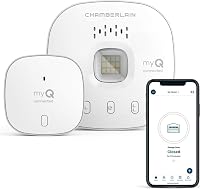
The Chamberlain smart garage control hub fits buyers who want to keep a compatible existing opener. It adds remote opening and closing, monitoring, shared access, and a close schedule through myQ.
Compatibility takes more than checking the opener's age. The hub works with many brands made after 1993 with photoelectric sensors that stay powered, but excludes Linear openers and Chamberlain Group models with yellow learn buttons made between 2010 and 2021.
It requires a sectional door, 2.4 GHz 802.11 B/G/N Wi-Fi, and a router within 50 feet. Chamberlain certifies this hub for US use only, and a second door needs an additional sensor sold separately.
Skip the hub if any of those requirements fail or Alexa is your deciding feature. It's a good fit when checking the door from your phone and giving someone access solve the actual problem.
Choose the video keypad for guest access
The myQ video keypad suits households that want separate codes for family, guests, or service visits. It controls 1 Chamberlain, LiftMaster, or Craftsman opener made after 1993.
You can assign unique PINs and limit passes to certain hours or days. Its wide-angle camera, live viewing, motion notifications, and two-way audio help you see and speak with someone at the garage.
Recorded video history, AI detection for people, cars, and packages, and enhanced motion detection require a subscription. A premium-feature trial is included, so decide which functions you need after that trial ends.
The keypad uses a battery pack, with an optional power adapter kit available for wired power. Skip it if you only want remote door control, don't need visitor access, or expect recorded history without a subscription.
What should you check before buying an Alexa-compatible controller?
Match the controller to your exact opener and your required tasks before comparing extra features. A compatible motor and useful commands matter more than a long list of smart-home names.
- Find the opener's brand, model number, and manufacture date on its label.
- Check model support and ask whether an adapter is required.
- Count separately controlled doors and the units each needs.
- Check Wi-Fi requirements and signal strength at the intended mounting spot.
- Confirm the voice commands and any ongoing feature fees.
Photograph the opener label and learn button before asking for compatibility help. A brand name alone can cover several generations with different control requirements.
Which Alexa commands do you need instead of MyQ app control?
Check opening, closing, and status queries as separate tasks. “Works with Alexa” doesn't mean all 3 are available or use the same security steps.
Ask whether a command needs a spoken code, app approval, or another action. If your goal is to check the door from bed, confirm that exact status request before buying.
For wider comparisons, use the best smart garage door openers guide. Focus on the feature you'll use daily rather than buying a replacement for functions an add-on can provide.
How should you set up and care for smart garage controls?
Start with a door that moves correctly, then add remote access. A smart controller won't correct a binding door, damaged hardware, or misaligned safety sensors.
Before installation, check that the existing wall control and remotes operate normally. Follow the device instructions for mounting, sensor placement, and pairing, and unplug equipment before making wiring connections where the instructions require it.
Set up the device's own app before adding voice control. Confirm that the reported door position matches the actual door, then try remote functions while someone can watch the opening and keep it clear.
For daily use, follow these habits:
- Give visitors separate access codes and remove access when it's no longer needed.
- Start with notifications before enabling automatic closing.
- Choose closing schedules that fit deliveries, yard work, and household arrival times.
- Keep safety sensors clear and wipe camera lenses with a soft cloth.
- Follow the manual's charging guidance for battery-powered accessories.
Keep a familiar local control available for household members. Phone access and voice commands add convenience, but everyone should know how to use the normal controls and the manual release safely.
What mistakes should you avoid with MyQ and Alexa?
Avoid choosing by the word “smart” alone. The right device depends on compatibility, the task you want, and how your household enters the garage.
Don't buy a hub to fix a weak or failing opener. Deal with the door's mechanical condition first, then decide which connected features are worth adding.
Don't confuse live viewing with saved recordings. That distinction matters for the video keypad if you want to review an event hours later.
Don't assume motor battery backup keeps your router online. Remote app functions still depend on the network connection, so consider that separately from moving the door during an outage.
For help deciding which conveniences justify the extra setup, read whether a smart garage door opener is worth it.
Which option should you choose for MyQ or Alexa control?
If “does myQ work with Alexa” is your deciding question, start with eKyro and verify its compatibility and commands. The myQ options here suit buyers whose priorities are phone access, guest entry, or video.
Pick the Chamberlain hub for a compatible working opener that needs app access. Choose the video keypad for individual PINs and visitor viewing, or the Chamberlain belt drive camera opener when replacing the motor also meets your needs.
Before ordering, write down your opener model and the 2 functions you need most. Use the guide to adding Wi-Fi to an existing opener to decide whether an add-on covers those needs.
Frequently asked questions
Does MyQ work with Alexa?
Alexa support isn't confirmed for the myQ devices covered here. They offer control or access features through the myQ app, while the separate eKyro controller explicitly supports Alexa.
Choose based on your exact opener model and the voice commands you need, rather than assuming Wi-Fi means Alexa compatibility.
Can Alexa close a MyQ garage door?
Alexa closing commands aren't confirmed for these myQ devices. A separate Alexa-compatible controller may let you add voice control to a compatible opener, but verify closing support and any security steps before buying.
That would be a connection through the separate controller, rather than proof of an Alexa connection through myQ.
Can I use Alexa to check whether my garage door is open?
An Alexa door-status command isn't confirmed for the devices covered here. The Chamberlain hub offers monitoring through the myQ app, and eKyro offers mobile monitoring plus Alexa support.
Ask specifically about spoken status checks, because support for a voice assistant doesn't tell you which individual commands it accepts.
What can I use if I want Alexa garage door control?
The eKyro Universal Wi-Fi garage door remote controller explicitly supports Alexa. It works with many existing openers, may need an adapter, and excludes RYOBI models.
Each separately controlled door needs its own controller, so confirm compatibility, adapter needs, and available Alexa commands before choosing it for your garage.