Can You Add Wi-Fi to a Garage Door Opener?
Yes, you can add Wi-Fi to many existing garage door openers with a compatible smart controller. Match your exact opener, safety sensors, door type, and home network before buying.
On this page (8 sections)
- Can you add Wi-Fi to a garage door opener you already have?
- What should you check before buying a controller?
- Which controller should you choose for your opener?
- How do you install a garage door Wi-Fi controller?
- What mistakes cause trouble after setup?
- Will adding Wi-Fi keep the garage working during an outage?
- When should you replace the opener instead?
- Which route should you take to add Wi-Fi to your garage door opener?
You can add Wi-Fi to many garage door openers with a compatible smart controller, keeping the motor and drive system you already have. Start with your opener's exact model, then choose the connection and app features you need.
A controller can add phone access, door status checks, and alerts. It won't improve lifting power, reduce drive noise, or repair a door that struggles to move.
Can you add Wi-Fi to a garage door opener you already have?
Yes, when the controller supports your exact opener and door. Most buying mistakes start with assuming that a familiar brand name or the word “universal” guarantees a match.
Find the model number on the opener housing, its manufacture date if available, and the learn-button color. Check the door style and the photoelectric safety sensors near the floor.
Use those details to confirm compatibility before ordering. Two openers from the same brand can need different smart accessories.
For the basics of drive systems and built-in connectivity, see garage door openers explained. If you're weighing a replacement, how to choose a garage door opener covers the features worth comparing.
What should you check before buying a controller?
Check compatibility first, then network access, door count, and the features you'll actually use. A controller with more app tools is no help if it can't operate your opener.
- Exact model: Confirm support for the model number, learn button, and any required adapter.
- Safety sensors: Check whether the controller requires sensors that remain powered after the door closes.
- Door type and count: Confirm the supported door style and what you'll need for each separate door.
- Network connection: Check the required Wi-Fi band or whether the device needs Ethernet.
- Access features: Decide whether you need phone control alone, voice support, shared access, or scheduled closing.
Check Wi-Fi reception near the planned mounting spot with the garage door closed. A phone signal there is a useful first check, but it doesn't confirm that a controller supports your router's settings.
If reception is weak, address coverage before mounting anything. Bluetooth used during setup doesn't replace the home-network connection needed for remote access.
Which controller should you choose for your opener?
Choose by opener compatibility and your main use: myQ access, an Ethernet gateway, voice control, or single-door shared access. These 4 options serve different setups, so they aren't interchangeable.
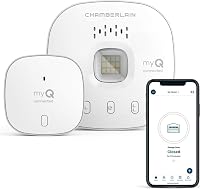
Who should add Wi-Fi with the Chamberlain smart garage control hub?
Choose Chamberlain for a supported sectional door when you want myQ phone control and shared access. The package includes a hub and door sensor, with Bluetooth to help with setup.
It works with many openers made after 1993 that use continuously powered photoelectric sensors. It requires a 2.4 GHz 802.11 b/g/n router within 50 feet and is certified for US use only.
Skip it for any Linear opener or a Chamberlain Group opener with a yellow learn button made from 2010 through 2021. Sensors that switch power mode after closing also rule it out.
This is a useful fit for households that want to give family or friends access and set a nightly close schedule. It also supports Amazon Key In-Garage Delivery for eligible Prime members.
For 2 doors, plan for an additional sensor sold separately. Confirm that both openers qualify before choosing this route.
When is the LiftMaster 828LM internet gateway the right choice?
Choose the 828LM for a compatible LiftMaster opener when an Ethernet connection suits your home. It adds internet access without connecting to Wi-Fi.
Compatibility is limited to LiftMaster Security+ 2.0 openers with both a myQ logo and yellow learn button, plus supported myQ lighting accessories. Skip it for other opener brands or if you need a Wi-Fi-connected device.
An available router connection makes this worth considering if you want myQ notifications and remote access. It also supports Amazon Key delivery.
During app setup, select “Smart Garage Hub,” then the pictured 828LM model, rather than “Garage Door.” Follow the prompts for its serial number and allow home data when requested.
Who should choose the Universal Wi-Fi garage door remote controller?
Choose this eKyro controller when Alexa, Google Home, or Siri support is central to your plans. It provides mobile monitoring and control, scheduling, and automatic closing.
eKyro says it supports most openers, though some need an adapter. Confirm that requirement before ordering, and skip it entirely for a RYOBI opener.
Core functions have no monthly fees, including supported voice features. Optional SMS messages or phone-call alerts may cost extra, so distinguish those extras from ordinary device functions.
Each separately controlled door needs its own eKyro controller. For a multi-door garage, count the complete setup rather than assuming one unit covers every opening.
Who should choose the Aladdin Connect smart garage door controller?
Choose the Genie ALKT2-R for one compatible door when temporary access and open-door alerts matter most. Its virtual keys let you grant temporary or ongoing access without handing over a physical remote.
The kit includes a door control module and position sensor. Genie says it works with most major opener brands, so confirm your exact model before committing.
Features include automatic close scheduling, alerts for a door left open, and support for Alexa, Ring, and Google Assistant. No monthly fees or subscriptions are required.
Skip this single-door package if you expect it to cover several doors by itself. Genie describes the setup as wireless, but follow the supplied instructions for the actual mounting and installation requirements.
How do you install a garage door Wi-Fi controller?
Follow the controller's manual in order, then confirm both door movement and app status before relying on remote access. Connection methods vary, so don't copy wiring instructions from a different model.
- Check normal operation. Resolve sticking, unexpected reversing, or sensor faults before adding the controller.
- Plan placement. Check network coverage, required power access, and clear space around moving parts.
- Mount the components. Secure the module and sensor in the positions specified by the manufacturer.
- Make required connections. Follow power-disconnection instructions before any wiring, and keep cables clear of the door and rail.
- Pair the app. Use the required network and the correct device choice.
- Confirm operation. With the opening clear and the door in sight, check wall controls, remotes, app commands, and reported door status.
Open and close the door fully, then confirm that the app reports each position correctly. A successful command alone doesn't prove that the position sensor is placed correctly.
Leave schedules and shared access until basic operation works. Keep your existing remotes available and another way into the garage.
What mistakes cause trouble after setup?
The common mistakes are enabling automation too soon, trusting stale door status, and granting more access than someone needs. Start with simple phone control, then add features one at a time.
Before enabling scheduled closing, consider when people use the garage and whether equipment could sit in the opening. Follow both manuals for checking the required safety functions, and never bypass a sensor.
For voice control, confirm the supported commands and any security steps rather than assuming every assistant can perform every action. Read does myQ work with Alexa? before choosing around that pairing.
Review shared access when a visitor or service provider no longer needs entry. Use temporary access where supported, protect the app account with a strong password, and enable extra account security if available.
Periodically check sensor mounts, visible cables, and the app's status reporting. Follow the sensor's maintenance and battery instructions, especially after moving equipment or working near the door.
Will adding Wi-Fi keep the garage working during an outage?
Wi-Fi control doesn't provide backup power for the opener. Remote access also depends on the controller and home network having the connections and power they need.
An internet outage and a power outage create different problems. Check the manuals for available local controls, and learn the manual release procedure while the door is operating normally.
If access during a power cut is your main concern, read whether you need garage door opener battery backup. For everyday convenience, is a smart garage door opener worth it? explains the broader tradeoffs.
When should you replace the opener instead?
Replace the opener when no suitable controller supports it or a qualified technician recommends replacement after checking a fault. Adding connectivity makes sense only when the existing door system works properly.
Don't buy an adapter to solve weak lifting, worn parts, or repeated door faults. Have those problems checked first, then decide whether keeping the opener is worthwhile.
Age can inform that choice, but condition matters too; our guide to how long garage door openers last explains what to consider. If replacement fits your needs, compare smart garage door openers.
Which route should you take to add Wi-Fi to your garage door opener?
Add Wi-Fi to your garage door opener when it works well and a controller meets your exact requirements. Choose Chamberlain for compatible myQ access, eKyro for its supported voice assistants, or Genie for single-door virtual keys and alerts.
Choose the LiftMaster 828LM only when its specific compatibility and Ethernet connection fit. Before ordering any option, settle the opener match, network connection, and number of doors.
If you need a new opener as well as phone control, use garage door openers explained to choose the drive system and features together.
Frequently asked questions
Can I add Wi-Fi to an old garage door opener?
Yes, if a compatible controller supports its model, door type, and safety sensors. Age alone doesn't settle compatibility: learn-button color and sensor behavior can also matter.
Find the opener's model number before shopping, and resolve door movement or safety faults before adding remote control.
Do I need to replace my garage door opener to get Wi-Fi?
No, a compatible add-on can provide smartphone control while you keep an opener that works properly. Replacement makes more sense when no controller fits or the opener needs replacement anyway.
Our garage door opener guide explains drive types and built-in features to compare before making that choice.
Does a Wi-Fi garage controller work if my internet goes out?
Remote app access generally needs a working internet connection, so don't rely on it during an outage. Check both manuals for the local controls available without internet or power.
Keep another way into the garage, and learn the manual release procedure and its warnings before you need it.
Can one Wi-Fi controller handle two garage doors?
It depends on the controller, so count separately controlled doors before buying. Chamberlain Smart Garage Control can handle a second door with an additional sensor sold separately.
Each eKyro-controlled door needs its own controller, while the Genie ALKT2-R package covered here is a single-door kit.