Are Wi-Fi Garage Door Openers Safe?
Yes, Wi-Fi garage door openers are safe when set up correctly. The opener pairs with your home network over an encrypted connection and sends you alerts, and a rolling-code remote keeps the door from being opened by a copied signal. The weak points are setup habits, not the Wi-Fi itself.
On this page (9 sections)
- How does a Wi-Fi garage door opener actually work?
- Are Wi-Fi garage door openers safe from hackers?
- What makes a smart opener safer than a plain remote?
- How do you set up a Wi-Fi opener safely?
- Does a Wi-Fi opener still work in a power outage?
- What about privacy and data from the app?
- Should you add Wi-Fi to an older opener or replace it?
- Which safety habits keep a Wi-Fi opener secure?
- So, are Wi-Fi garage door openers safe?
Yes, Wi-Fi garage door openers are safe when installed and set up correctly. The opener links to your home network over an encrypted connection and sends alerts when the door moves.
The weak points are setup habits, not the Wi-Fi itself.
If you're shopping for one or thinking about adding Wi-Fi to an existing opener, you don't need to worry about the technology breaking your door. You need to know what makes a Wi-Fi opener safe and what makes it easy to misuse.
How does a Wi-Fi garage door opener actually work?
A Wi-Fi opener connects to your home router and to a phone app, so you can open, close and watch the door from anywhere. The opener keeps its own radio link to the remotes and keypad.
The Wi-Fi part only carries commands and status between the opener and the app. It doesn't replace the safety sensors or the reversing system on the door.
Those still do the physical work of stopping the door if something blocks it.
That separation matters. A network glitch can stop your phone from working, but the door itself still opens with the wall button or a remote.
That's the same fallback every standard opener has.
Are Wi-Fi garage door openers safe from hackers?
A properly set up Wi-Fi opener is very hard to break into, because commands travel over an encrypted connection. The realistic risk is a weak password or an old account someone kept.
Most smart openers use an encrypted cloud link between the app and the opener. The command isn't a raw radio signal someone can grab from the driveway.
To get in, an attacker would need your account login, not just proximity to your house.
The bigger hole is human. A shared login passed around the family, a password reused from another site, or a guest account you forgot to remove all give access.
Treat the garage app like your email account and the risk drops fast.
What makes a smart opener safer than a plain remote?
A Wi-Fi opener adds alerts, activity history and a remote close, which a plain remote doesn't give you. Those are real safety features, not just conveniences.
With an app, you can see whether the door is open while you're at work or on a trip. You can close it if someone left it up.
You can also get a notice when the door opens, so an unexpected opening shows up right away.
Older fixed-code remotes were the weak spot in the past, because a copied code could be replayed. Modern openers use rolling codes, and a smart hub keeps that protection while adding the phone layer.
Our explainer on garage door openers and drive types covers how the radio side works.
How do you set up a Wi-Fi opener safely?
Set it up with a strong unique password, two-factor login where the app offers it, and a short list of users. Those three steps close most of the realistic risk.
Start by giving the app its own password, not one you use elsewhere. Turn on two-factor authentication if the app supports it.
Then add only the people who actually need access, and name each user so the activity log makes sense.
Keep the opener's firmware current. Updates usually fix security bugs, and the app will tell you when one is ready.
If the app shows a schedule or auto-close feature, use it so the door never sits open by accident.
Which smart controller is a safe first pick?
The eKyro Smart Garage Door Opener is the one we'd pick for most people adding Wi-Fi to an existing door. It's a universal adapter that connects to your current opener and links to Wi-Fi for monitoring and control from your phone or a voice assistant.
It works with Alexa, Google Home, Siri and Android, and multiple units can be paired for a multi-stall garage. There are no monthly fees for the core features, including scheduling and automatic door closing.
The open-door alert and scheduled checks are the safety features that matter most here. See how it compares in our guide to the best smart garage door openers.
Does a Wi-Fi opener still work in a power outage?
A Wi-Fi opener needs power and a network to reach your phone, so a standard unit goes quiet in an outage. The door still opens by hand, but the app and voice control stop.
That's why battery backup matters. An opener with a backup battery keeps the door moving when the power drops.
You still lose phone control without Wi-Fi, but you can get the car in and out.
If outages are common where you live, a backup unit is the safer buy. It also protects you from being locked out when the power fails and nobody is home to pull the release.
Which opener has backup power built in?
The Chamberlain 1/2 HP belt drive opener with battery backup is the pick when outages are a real concern. It's a complete opener with a battery backup that keeps the door working during a power failure.
The reinforced belt and DC motor keep it quiet, which suits a garage under or next to bedrooms. The 1/2 HP motor handles standard doors, and it works with HomeLink in most cars made after 2016.
It also includes a one-button remote and wall control. If your door is heavy or oversized, size up the horsepower instead.
What about privacy and data from the app?
A Wi-Fi opener collects basic door status and usage data, and the app maker stores it to run alerts and history. That's normal for smart home gear, and it's limited to the door.
The data is not a camera feed unless you add one. It's usually open and closed events, timestamps and which user acted.
That history is exactly what makes the opener safer, since you can review what happened.
Check the app's privacy settings and turn off sharing you don't need. Use a separate account for the garage if you'd rather keep it apart from your other smart home apps.
For a deeper look at whether the upgrade pays off, read is a smart garage door opener worth it.
Should you add Wi-Fi to an older opener or replace it?
Adding Wi-Fi to a working opener is usually the cheaper and safer first step, as long as the opener has standard safety sensors. Replacing makes sense when the opener is old or lacks safety features.
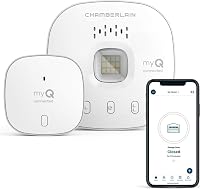
A smart hub like the Chamberlain Smart Garage Control adds phone control and alerts to most openers made after 1993 that use standard safety sensors. It's a small add-on rather than a new motor and rail.
It uses Wi-Fi and Bluetooth, so setup is quicker, and it supports a close schedule and in-garage delivery. It works with most brands, but not every opener; check yours against the compatibility notes before buying.
Our walkthrough on how to add Wi-Fi to a garage door opener covers the fit check.
Which safety habits keep a Wi-Fi opener secure?
The habits matter more than the hardware. Use a strong password, keep the user list short, and never open the door blind from your phone.
Turn on alerts so an unexpected opening reaches you. Keep a remote or keypad as a backup for network outages.
Review the activity log now and then, and remove users who no longer need access.
Test the safety reverse every month with a small object in the door's path. Wi-Fi doesn't change that check, and it's the one that protects people and pets.
A smart opener is a convenience layer on top of a system that still needs basic upkeep.
So, are Wi-Fi garage door openers safe?
Are Wi-Fi garage door openers safe? Yes, when you set them up with a unique password, limited users and alerts turned on.
The encryption and rolling codes do the technical work; your setup habits do the rest.
If your current opener is in good shape, add a hub or universal adapter first. Pick the eKyro adapter for phone control and open-door alerts on most existing doors.
Pick the Chamberlain battery backup opener if outages are common or the opener is due for replacement. Then keep the safety reverse test on your monthly list and the door stays as safe as it was before Wi-Fi, with more ways to check on it.
Frequently asked questions
Can someone hack a Wi-Fi garage door opener?
A well-secured Wi-Fi opener is hard to break into, but weak account passwords and shared access codes make it easier. Use a strong password with two-factor login when the app offers it, and remove old users when you move or change roommates.
Is it safe to open the garage door from my phone while away from home?
Yes, as long as you watch the camera or the app's open and closed status before and after. Never open the door blind, and close it right away so it isn't left up while nobody is home.
What should I do if I lose my phone with the garage app on it?
Change your account password first so the app signs out on that device. Then remove the lost phone from the app's user list and give the door a fresh access code.
Review the activity log to see when the door last moved.
Are Wi-Fi openers as safe as a regular remote?
They're as safe or safer when configured right. Wi-Fi control adds encrypted cloud links, alerts and activity history that a plain remote doesn't have.
The remote still works as the fallback when the network drops.